Dash Cam Laws in California: Where You Can Mount One and What You Can Record
Published October 15, 2026
Quick answer
Dash cams are legal in California for private drivers, but two rules shape how you use one: the camera and its mount must not obstruct the driver's view through the windshield, and because California is a two-party consent state, recording private conversations on audio can create legal risk. Mount the camera high on the windshield behind the mirror, keep the lens below the top of the wiper sweep, and mute the microphone unless every passenger consents. Dash cam laws in California do not ban the device itself; they govern where it sits and what it records.
Table of contents13 sections · tap to expand
Key takeaways
- A dash cam is legal in California, but mounting it where it blocks the driver's view can violate the windshield obstruction rule.
- California's two-party consent law means audio recording of private conversations requires consent from everyone involved, so muting the mic is the safer default.
- Footage can support an insurance claim or a dispute, but no camera guarantees an insurer or court will accept it.
- Supercapacitor power and a hardwire kit with low-voltage cutoff matter in California heat and for street parking.
- A front-only 2K camera handles most commutes; rideshare and fleet drivers need an interior channel as well.
As an Amazon Associate we earn from qualifying purchases. This never changes which products we recommend.
Recommended products
Products that fit this
| Product | Best for | Where to buy |
|---|---|---|
| VIOFO A119 V3 | Simple front-only recording for a commuter who wants clear 2K footage and heat tolerance. | Check price on Amazon |
| 70mai T800E | Rideshare and family drivers who need front, rear, and interior coverage with heat tolerance. | Check price on Amazon |
| IIWEY N5 | Drivers who want all-around 360-degree coverage including sides and interior. | Check price on Amazon |
Are dash cams legal in California?
Yes. California does not prohibit private drivers from using a dash cam, and no state law requires a permit or registration for one. The California Vehicle Code regulates what can obstruct a windshield and how recordings of private conversations may be made, not the presence of a camera on the glass.
The practical limits are mounting and audio. A camera that blocks the driver's view through the windshield can be treated as an obstruction, and a dash cam microphone that captures a private conversation without consent can raise a legal issue under the state's two-party consent rule.
Commercial drivers face additional employer and carrier policies, and rules for windshield placement and recording consent differ by state and country. Check your own situation before relying on any single rule of thumb.
Where can you legally mount a dash cam in California?
Mount the dash cam high on the windshield, behind the rearview mirror, so the lens sits below the top edge of the windshield wiper sweep and outside the driver's direct line of sight. That position keeps the camera out of the swept area the driver actually looks through and is the placement most commonly treated as acceptable.
The California windshield obstruction rule is aimed at anything that blocks the driver's view, and a camera body, mount arm, or dangling cable can all count. A compact, screenless or low-profile camera is easier to place legally than a large unit with a big display, because it occupies less of the glass.
Avoid the center of the driver's side of the windshield and the area directly in front of the steering wheel. If you use a suction or adhesive mount, keep the footprint small and route the power cable along the headliner and down the A-pillar rather than letting it cross the windshield.
A rear camera mounts on the rear glass and does not affect the front view, but check that it does not block the driver's view through the rear window or interfere with a rear wiper. Laws and enforcement vary, so confirm local requirements if you are unsure.
Is it legal to record audio with a dash cam in California?
California is a two-party consent state, which means recording a private conversation generally requires the consent of everyone involved. A dash cam microphone can pick up passengers, pedestrians, or a conversation at a drive-through, so leaving audio on by default carries more risk than most drivers assume.
The safest approach is to mute the microphone or disable audio recording in the camera settings. Many dash cams, including the models below, include a built-in microphone that can be turned off, and some let you keep audio off while video continues normally.
If you want audio, tell passengers clearly that the camera records sound and get their agreement before the trip. Rideshare and taxi drivers should treat this as a routine step, since a posted sign alone may not satisfy the consent requirement in every situation.
Video-only recording avoids the consent question entirely and is usually enough for a collision dispute, where the visual sequence of events matters more than sound.
Can you use dash cam footage with insurance or in a dispute?
Dash cam footage can support an insurance claim or a dispute by showing what happened, but no camera guarantees that an insurer, arbitrator, or court will accept the recording. Treat footage as strong supporting evidence, not as an automatic outcome.
What makes footage useful is legibility and continuity: a clear view of the other vehicle, a readable license plate, a visible traffic signal, and a timestamp and location stamp. GPS overlays that record speed, time, and route add context that helps an adjuster match the clip to the incident.
Keep the original file rather than a compressed copy, and preserve the event clip before loop recording overwrites it. A camera with a G-sensor locks impact footage so it is not deleted, which protects the segment you are most likely to need.
Insurers and courts handle footage differently, and rules vary by state and country. Provide the clip promptly and let your insurer or legal advisor decide how to use it.
What dash cam features matter for California drivers?
Channels come first. A front-only camera covers most commutes, a two-channel setup adds a rear view for rear-end and lane-change disputes, and a three-channel camera adds an interior view that rideshare and fleet drivers need for passenger incidents.
Video quality decides whether a plate is readable. Look for 2K or 4K front resolution, a Sony STARVIS or STARVIS 2 sensor, and HDR or WDR processing for night and high-contrast conditions. Resolution alone does not guarantee legibility, but a better sensor and HDR give the camera more to work with in low light.
Heat tolerance matters in inland California. A supercapacitor handles high cabin temperatures better than a lithium battery, which is why most current dash cams use one. Parking mode and a hardwire kit with low-voltage cutoff protect the car battery when the camera runs while parked.
Storage and convenience round out the list. Use a high-endurance microSD card, size it for the number of channels you run, and choose GPS, Wi-Fi app transfer, and a CPL filter for windshield glare if those help your routine.
Do you need a hardwire kit for parking mode in California?
Parking mode generally requires a hardwire kit or an OBD power cable, because the camera needs a constant power source that stays live when the ignition is off. Plugging into the 12V socket usually cuts power when the car is off, so parking mode will not run.
A hardwire kit with low-voltage cutoff monitors the car battery and shuts the camera down before the battery drops too far to start the engine. That protection is the reason a kit is worth the extra install step, especially for a car that sits for days at a time.
Parking modes differ in what they capture. Buffered parking mode saves the seconds before and after an impact, time-lapse records at a low frame rate to stretch storage, and impact-only mode wakes and locks a short clip when the G-sensor triggers. Buffered recording is the most useful for a hit-and-run because it includes the moments leading up to the event.
If you park on the street overnight in a city, a hardwired camera with buffered parking mode and low-voltage cutoff is the configuration that protects both the car and the battery.
How do you install a dash cam without breaking California rules?
The install goal is a camera that records the road while leaving the driver's view through the windshield clear. Plan the mount position first, then route power so no cable crosses the glass in front of the driver.
Adhesive mounts hold better than suction cups in California heat, and a static sticker under the adhesive makes removal easier without damaging tint or glass. Clean the glass before mounting and let the adhesive cure before you rely on it.
- Park in the shade and clean the windshield area behind the rearview mirror.
- Test-fit the camera so the lens sits below the top of the wiper sweep and outside the driver's direct line of sight.
- Apply a static sticker, then press the adhesive mount firmly and let it cure.
- Route the power cable up along the headliner, down the A-pillar, and under the dash to the 12V socket or hardwire kit.
- For a rear camera, run the cable along the headliner and door seals, checking that it reaches the rear glass on long SUVs and trucks.
- Power on, confirm the field of view covers the road, and turn the microphone off if you do not want audio.
- Format the microSD card in the camera and verify that loop recording and the G-sensor are active.
Which dash cams fit California driving?
The right camera depends on how you use the car. A commuter who wants a simple, heat-tolerant front camera has different needs from a rideshare driver who must document the cabin or a street-parker who wants buffered parking mode.
For a straightforward front-only setup, the VIOFO A119 V3 records 2K at 1440p with a Sony STARVIS IMX335 sensor, HDR night video, and a 140-degree lens. It uses a supercapacitor, supports buffered parking mode with the separately sold VIOFO HK3 hardwire cable, and takes microSD cards up to 256GB. It is a good fit for a driver who wants clear front footage without a rear or interior channel, but it does not include a rear camera and needs the hardwire kit for parking mode.
For rideshare and fleet drivers who need to document the cabin, the 70mai T800E records 4K front, 1080p interior, and 1080p rear, with HDR, switchable infrared for the interior camera, GPS, Wi-Fi 6, voice control, and a supercapacitor rated for extreme temperatures. It includes a 64GB card, supports up to 512GB, and ships with a hardwire kit for parking monitoring.
The tradeoff is that its parking mode is impact detection rather than buffered, so it locks a clip on impact but does not save the seconds before it.
For maximum coverage, the IIWEY N5 runs four channels at 1080p each for a 360-degree view of front, rear, sides, and interior, with 5GHz Wi-Fi app control and a supercapacitor rated from -4F to 167F. It comes with a 128GB card and supports up to 256GB. It has no GPS, its parking mode is time-lapse and impact detection rather than buffered, and it needs the separately sold hardwire kit for parking mode, so it suits a driver who wants all-around coverage more than route logging.
Avoid these
Common mistakes to avoid
- Mounting the dash cam in the center of the windshield or directly in front of the driver. Place it high behind the rearview mirror, below the top of the wiper sweep and outside the driver's direct line of sight.
- Leaving the dash cam microphone on by default in a two-party consent state. Mute the microphone or disable audio in the settings unless every person in the car has agreed to be recorded.
- Expecting parking mode to work from the 12V socket alone. Use a hardwire kit or OBD cable with low-voltage cutoff so the camera has constant power without draining the car battery.
- Assuming any clip will be accepted by an insurer or court. Preserve the original file, keep the event clip locked, and provide footage promptly; no camera guarantees acceptance.
Useful tools
Tools that help
As an Amazon Associate we earn from qualifying purchases. This never changes which products we recommend.
Helpful tool
VIOFO A119 V3
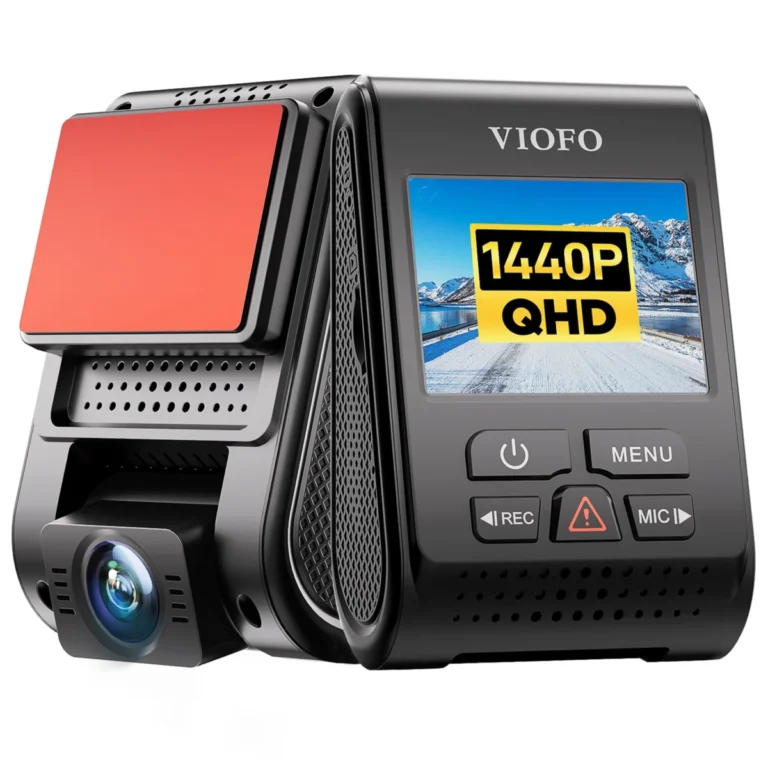
- Helps with: Simple front-only recording for a commuter who wants clear 2K footage and heat tolerance.
- Why it fits: It records 1440p with a Sony STARVIS IMX335 sensor and HDR, uses a supercapacitor, and supports buffered parking mode with the separately sold VIOFO HK3 hardwire cable.
- Keep in mind: No rear or interior channel, and the hardwire kit is sold separately for parking mode.
Helpful tool
70mai T800E
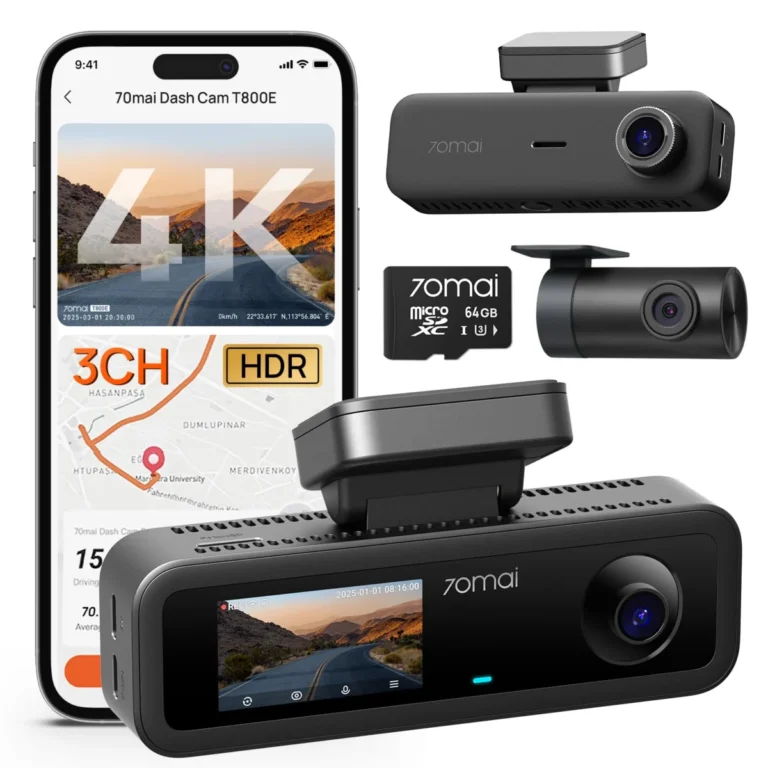
- Helps with: Rideshare and family drivers who need front, rear, and interior coverage with heat tolerance.
- Why it fits: It records 4K front, 1080p interior, and 1080p rear with HDR and switchable infrared, includes a 64GB card and a hardwire kit, and uses a supercapacitor rated for extreme temperatures.
- Keep in mind: Parking mode is impact detection rather than buffered, so it does not save the seconds before an impact.
Helpful tool
IIWEY N5
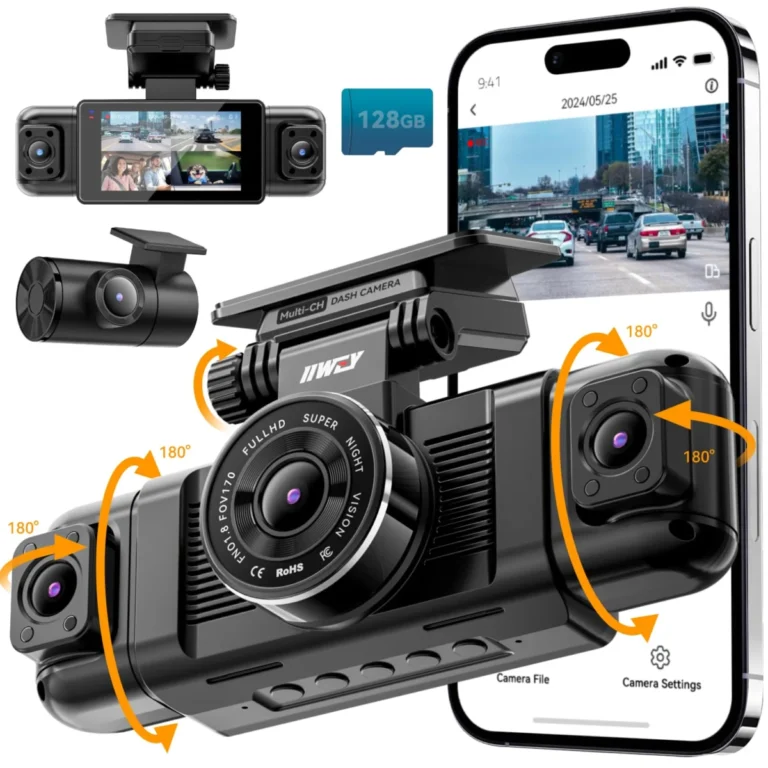
- Helps with: Drivers who want all-around 360-degree coverage including sides and interior.
- Why it fits: It runs four 1080p channels for front, rear, sides, and interior, includes a 128GB card, and uses a supercapacitor rated from -4F to 167F.
- Keep in mind: No GPS, parking mode is time-lapse and impact detection rather than buffered, and the hardwire kit is sold separately.
See also: 7 Dash Cams Ranked for Commuters, Rideshare Drivers and Street Parkers; Dash Cam Laws in Texas: Mounting, Audio and Footage Rules; Dash Cam Laws in Florida: Mounting, Audio Consent and Heat Rules.
Common questions
Frequently asked questions
Are dash cameras legal in California?
Yes, private drivers may use a dash cam in California. The law regulates windshield obstruction and audio recording consent rather than the camera itself, so legality depends on where you mount it and whether you record sound.
Can a dash cam block your view in California?
It can if it obstructs the driver's view through the windshield. Mount the camera high behind the rearview mirror with the lens below the top of the wiper sweep, and keep the mount and cables out of the driver's line of sight.
Is it illegal to record audio with a dash cam in California?
California requires consent from all parties to record a private conversation, so audio recording without consent can create legal risk. Muting the microphone or disabling audio in the camera settings avoids the issue for most drivers.
Can police ask to see your dash cam footage in California?
Officers may ask, but you are not required to hand over your device or files on the spot. You can decline and consult an attorney; if footage is needed for an investigation, it can be requested through proper legal process.
Do dash cams overheat in California summers?
They can, especially in a parked car in inland heat. A supercapacitor handles high temperatures better than a lithium battery, and cameras rated for extreme heat, such as the 70mai T800E and IIWEY N5, are built for that condition.
What size microSD card do you need for a dash cam in California?
Size it to your channels and driving time. A single front camera is fine with 128GB, while multi-channel setups benefit from 256GB or more; use a high-endurance card and format it in the camera.
Next step
Decide your channel count first: front-only for a commuter, front and rear for a daily driver, or front, rear, and interior for rideshare and fleet work. Then mount the camera high behind the mirror, mute the microphone unless everyone consents, and add a hardwire kit with low-voltage cutoff if you want parking mode.
Keep reading
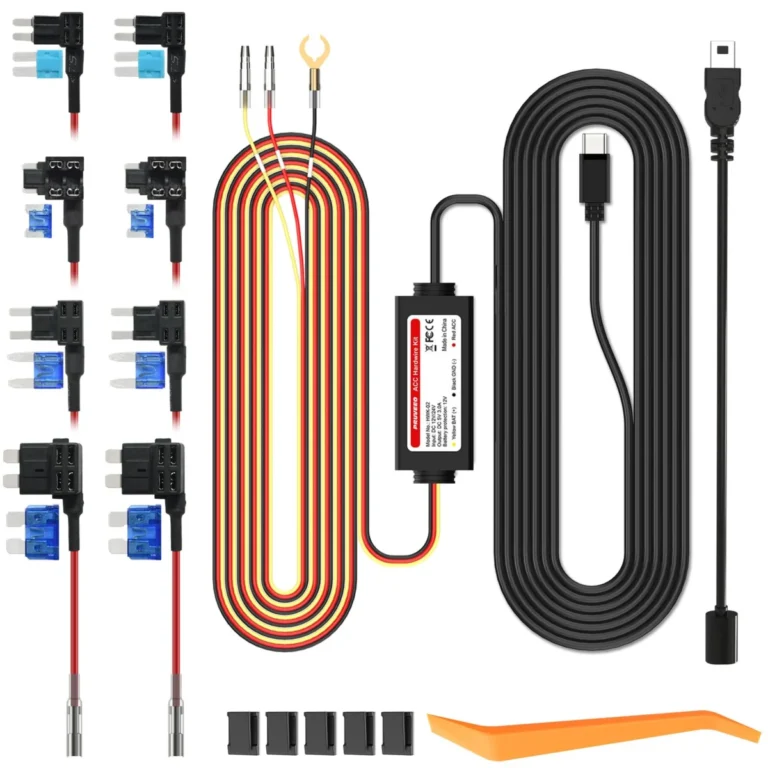
How to Set Up Dash Cam Parking Mode: Wiring, Cutoff and Settings
To set up dash cam parking mode, give the camera a constant power source (a fused fuse-box connection or an OBD cable,…
Does a Dash Cam Lower Car Insurance? What It Really Saves
A dash cam usually does not lower your car insurance premium. Most insurers do not treat a camera as a rating factor,…
Dash Cam Laws in Texas: Mounting, Audio and Footage Rules
Dash cams are legal in Texas for private drivers recording from their own vehicle, and dash cam laws in Texas impose no…