How to Set Up Dash Cam Parking Mode: Wiring, Cutoff and Settings
Published October 21, 2026
Quick answer
To set up dash cam parking mode, give the camera a constant power source (a fused fuse-box connection or an OBD cable, not the 12V socket), set the low-voltage cutoff so the camera shuts down before the car battery is drained, then choose a parking mode type and tune G-sensor and motion sensitivity in the camera menu. Parking mode is the camera's low-power state when the engine is off: it stops continuous recording and instead wakes for impacts, motion, time-lapse frames or low-bitrate video. The cutoff is the part that protects your ability to start the car the next morning.
Table of contents13 sections · tap to expand
Key takeaways
- Parking mode needs constant power, so a fused connection to the fuse box or an OBD power cable is required for most modes; the 12V socket usually loses power with the ignition.
- Buffered parking mode saves the few seconds before an impact, which is the most useful evidence for a hit-and-run or door ding.
- The low-voltage cutoff, not the camera, is what prevents a flat battery; typical kits cut power around 11.8V to 12V.
- Sensitivity settings decide whether parked recording captures real events or fills the card with false triggers.
- A supercapacitor camera and a high-endurance microSD card matter more in parked use than in normal driving.
As an Amazon Associate we earn from qualifying purchases. This never changes which products we recommend.
Recommended products
Products that fit this
| Product | Best for | Where to buy |
|---|---|---|
| PRUVEEO Smart Acc Hardwire Kit | Hardwiring a Mini USB or Type-C camera for parking mode | Check price on Amazon |
| ROVE Ultimate Hardwire Kit | Powering a ROVE USB-C dash cam for 24-hour parking monitoring | Check price on Amazon |
| 70mai UP03 Hardwire Kit | Powering a 70mai Type-C camera with battery protection | Check price on Amazon |
What is dash cam parking mode and how does it work?
Parking mode is a low-power recording state a dash cam enters when the engine is switched off. Instead of recording continuously, the camera waits in a standby state and starts recording only when something triggers it, or it records at a reduced frame rate or bitrate to stretch power and card space.
The camera can only do this if it still has power after the ignition is off. That is why parking mode is tied to a constant live feed from the fuse box or battery rather than the accessory socket, which normally goes dead with the key.
A hardwire kit also handles the switch automatically. Most kits detect the accessory signal and tell the camera to move into parking mode when the engine stops, then return it to normal recording when you start the car.
Not every dash cam supports parking mode at all. Check the menu or manual for a parking mode or parking monitor entry before buying wiring; if the feature is absent, no cable will add it.
Which parking mode type do you need?
Buffered parking mode is the most useful for evidence because it keeps a rolling few seconds of footage and writes it to the card when the G-sensor detects an impact, so you see what led up to the hit. It requires constant power and enough memory buffer in the camera.
Impact-only mode records only when the G-sensor is triggered. It saves power and card space but often starts recording after the moment of contact, so the first second of a door ding or bumper tap can be missed.
Time-lapse parking mode records one frame every second or so, producing a fast, low-power clip of everything that happened. It captures movement across a long period but gives choppy detail, which is weaker for reading a plate.
Low-bitrate parking mode records continuously at reduced quality. It gives a complete timeline and better motion detail than time-lapse, at the cost of more power draw and card space.
Match the mode to the risk: buffered or low-bitrate for street parking and overnight hit-and-run risk, time-lapse for long unattended periods in a lot, impact-only only where power is tight.
Do dash cams record when the car is off without a hardwire kit?
Usually not for long. The 12V socket is typically switched with the ignition, so the camera loses power the moment you turn the key off, and parking mode never starts. Some vehicles keep the socket live, but that varies by model and is not something to rely on.
An OBD power cable plugs into the diagnostic port and can supply constant power with a cutoff built in. It is the least invasive option for drivers who do not want to touch the fuse box, though not every vehicle keeps the OBD port live when parked.
A fused connection to the fuse box is the reliable route. It joins a constant live circuit and a switched circuit, provides the accessory signal the camera needs to change modes, and includes the low-voltage cutoff that protects the battery.
If your camera has no parking mode feature, or your car's fuse box is hard to reach, a simpler option is to accept driving-only recording and skip parked surveillance entirely.
How to hardwire a dash cam for parking mode, step by step
Hardwiring means adding a fused connection from the car's fuse box to the camera, with one live feed and one ignition-switched feed. Work with the ignition off, use the fuse puller and a multimeter, and keep the camera's own inline fuse in place.
Choose fuses that suit the job: a constant live circuit for parking power and an accessory circuit that goes dead with the key for the mode switch. Avoid safety circuits such as airbags, ABS or engine management.
The PRUVEEO Smart Acc Hardwire Kit includes eight fuse tap cables, a crowbar for trim, cable clips and a Mini USB to Type-C adapter, which covers most fuse types and both common camera ports. Its cutoff is listed at 11.8V, and it converts 12V-30V input to 5V/3A output.
- Park with the ignition off and locate the interior fuse box; check the manual for the layout.
- Use a multimeter to find one fuse that stays live with the key off and one that goes dead, then confirm the ratings.
- Fit a fuse tap to each chosen fuse, keeping the original fuse in the tap's lower slot and adding a correctly rated fuse for the camera circuit.
- Connect the kit's constant wire to the live fuse tap and its accessory wire to the switched fuse tap.
- Run the cable along the headliner and A-pillar, keeping it clear of airbags, and tuck it with the supplied clips.
- Connect the ground wire to a bare metal chassis bolt near the fuse box.
- Plug the camera in, set the low-voltage cutoff if the kit allows it, and turn the ignition on and off to confirm the mode switch.
- Test parked recording before relying on it, following the check sequence further down.
Helpful tool
PRUVEEO Smart Acc Hardwire Kit
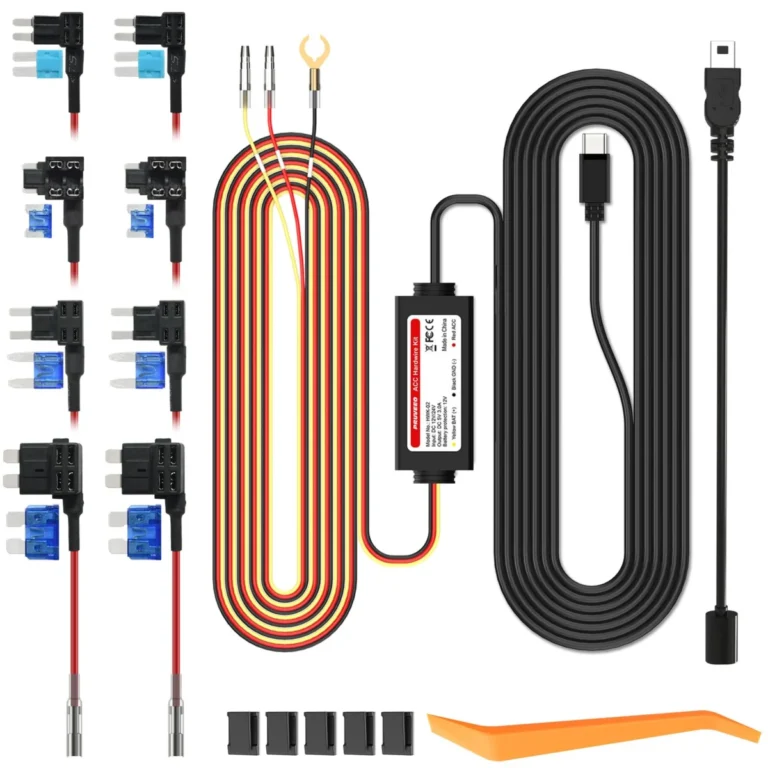
- Helps with: Hardwiring a Mini USB or Type-C camera for parking mode
- Why it fits: Eight fuse taps, a Mini-to-Type-C adapter and a 11.8V cutoff cover most vehicles and both common camera ports, and the ACC detection switches the camera into parking mode automatically.
- Keep in mind: The 10.5 ft cable may be short for routing to the rear of a long SUV or truck.
How to set the low-voltage cutoff to protect your battery
The low-voltage cutoff is a voltage threshold at which the kit disconnects the camera so the car battery keeps enough charge to start the engine. It is the single setting that decides whether parked recording is safe on your battery.
A cutoff around 11.8V to 12V is the common default and a sensible balance for a healthy battery in mild weather. Raising it shortens parked recording time but leaves more starting margin; lowering it extends surveillance at the risk of a no-start.
Cold weather, an older battery or a short daily commute all argue for a higher cutoff or a shorter parking timer. A battery that is already weak will not support overnight recording at any setting.
The 70mai UP03 hardwire kit cuts power below 11.8V on a small car and 23.6V on a large vehicle, converts 12V-30V to 5V/2.4A, and carries an 18-month warranty. Its Type-C output suits 70mai cameras such as the M310, A510, A500S, A810, X800 and A810 Lite.
Helpful tool
70mai UP03 Hardwire Kit
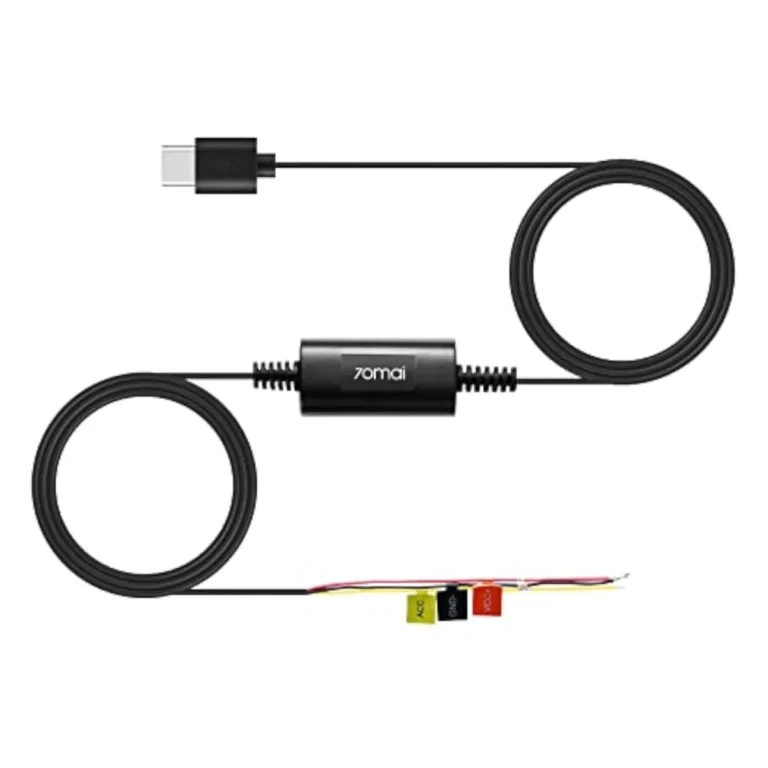
- Helps with: Powering a 70mai Type-C camera with battery protection
- Keep in mind: Fits 70mai Type-C models such as the M310, A510, A500S, A810, X800 and A810 Lite, not other brands.
Which parking mode settings to change in the app
Start with G-sensor sensitivity. A high setting triggers on wind, passing traffic and door slams and fills the card with locked event files; a medium setting that still catches a real bump is usually the right compromise. Test by tapping the bumper, not by shaking the car.
Motion detection is a separate trigger and is often the biggest source of false events in a busy street. If your camera offers it, enable it only where you actually want pedestrian or vehicle movement logged, and pair it with a recording timer.
Set a parking recording timer so the camera stops after a fixed number of hours rather than running until the battery cutoff. Overnight coverage is usually enough; all-day recording in a long-stay car park is what drains batteries.
Reduce resolution or bitrate while parked if the menu offers it. Lower-quality parked clips still show a plate at close range and use far less card space than full-quality continuous recording.
Check that event files lock. The G-sensor should mark impact clips as protected so loop recording cannot overwrite the footage you need.
Heat, storage and cards for parked recording
A parked car in sun gets far hotter than one in use, which is hard on lithium batteries. A supercapacitor holds charge without a chemical battery to degrade, so supercapacitor cameras tolerate heat better over years of parked recording.
Use a high-endurance microSD card. Cards built for dash cams are rated for constant rewriting, and a standard card in a camera that records every day while parked will fail sooner.
Loop recording overwrites the oldest ordinary clips once the card is full, so card size sets how far back your parked footage goes. Locked event files stay until you delete them, which is why sensitivity matters.
Format the card in the camera after installation and check it periodically. A card that has stopped writing is the most common reason parked footage is missing when it is needed.
How to test that parking mode is working
Test in daylight with the car parked and the ignition off. Turn the key off, wait for the camera to announce or show parking mode, then trigger the G-sensor with a firm tap on the bumper or door and check that a clip is saved.
Review the clip on the camera screen or in the app. Confirm it shows the moments before and after the tap if your camera supports buffering, and confirm the file is locked.
Leave the car parked overnight and check the next morning that the camera powered down cleanly and the car started normally. If the battery is flat, raise the cutoff or shorten the parking timer.
If nothing records, check the fuse taps first, then the ground connection, then the camera's parking mode setting. A kit LED that does not light usually points to a wiring fault rather than a camera fault.
- Switch the ignition off and confirm the camera enters parking mode.
- Trigger the G-sensor with a firm tap and check a clip is saved and locked.
- Review the clip for pre-impact footage if buffering is supported.
- Leave the car overnight and confirm it starts normally the next morning.
- If nothing records, check fuse taps, ground, then the camera menu setting.
Which hardwire kit fits your camera
Hardwire kits differ mainly in connector type, output and cutoff, so match the kit to your camera's port before buying. A Mini USB camera needs a Mini USB kit or an adapter; a Type-C camera needs a Type-C kit.
The ROVE Ultimate hardwire kit is built for ROVE R2-4K, R2-4K PRO, R2-4K DUAL, R2-4K DUAL PRO and R3 cameras with a USB-C port, and includes fuse taps, a volt meter and an installation manual. It is the straightforward choice if you own one of those models, and the wrong choice for any other brand.
For a mixed or unknown setup, the PRUVEEO kit's eight fuse taps and Mini-to-Type-C adapter cover more vehicles and ports. The 70mai UP03 is the neatest fit for 70mai Type-C cameras and adds an 18-month warranty.
None of these kits adds parking mode to a camera that lacks the feature, and none removes the need to check your fuse layout before you start.
Helpful tool
ROVE Ultimate Hardwire Kit
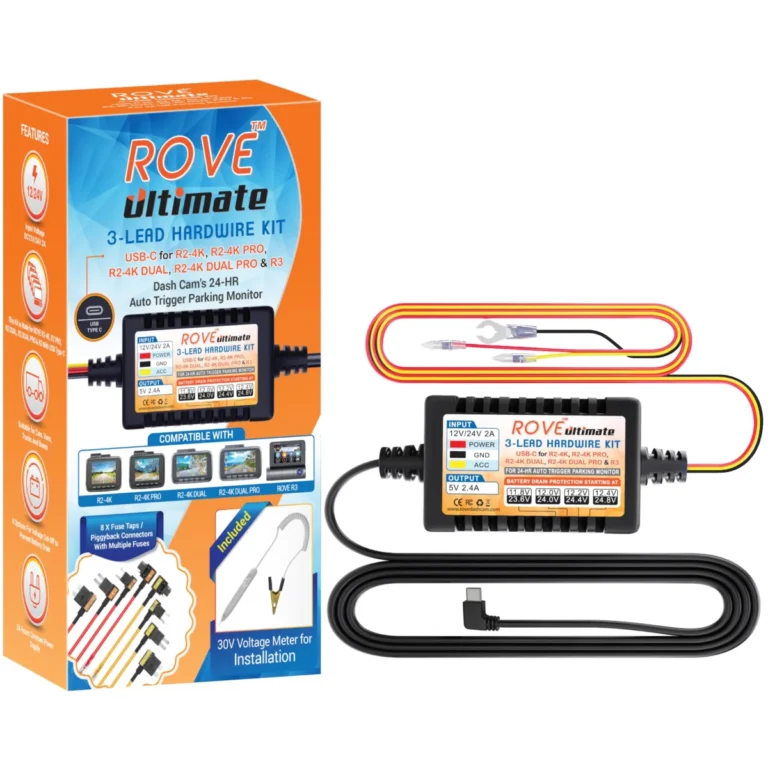
- Helps with: Powering a ROVE USB-C dash cam for 24-hour parking monitoring
- Why it fits: Built for ROVE R2-4K, R2-4K PRO, R2-4K DUAL, R2-4K DUAL PRO and R3 cameras, and includes fuse taps, a volt meter and an installation manual.
- Keep in mind: It is designed for ROVE cameras only, so it will not suit another brand.
Avoid these
Common mistakes to avoid
- Plugging the camera into the 12V socket and expecting parking mode to work. Use a fused connection to the fuse box or an OBD cable so the camera keeps constant power with the ignition off.
- Leaving the low-voltage cutoff at its lowest setting to maximise recording time. Keep the cutoff near 11.8V to 12V, or raise it in cold weather or with an older battery, and set a parking timer.
- Setting G-sensor and motion sensitivity to maximum. Use a medium setting and test with a firm tap so real impacts are caught without filling the card with false events.
- Tapping a safety fuse such as an airbag or ABS circuit. Choose a constant live circuit and an accessory circuit that are not safety-related, and confirm with a multimeter.
- Using an ordinary microSD card for daily parked recording. Fit a high-endurance card and format it in the camera after installation.
As an Amazon Associate we earn from qualifying purchases. This never changes which products we recommend.
See also: 7 Dash Cams Ranked for Commuters, Rideshare Drivers and Street Parkers.
Common questions
Frequently asked questions
Does parking mode drain the car battery?
Parking mode does draw power, but the low-voltage cutoff stops the camera before the battery is too flat to start the engine. A healthy battery with a cutoff near 11.8V to 12V and a sensible parking timer usually copes with overnight recording. A weak battery may not.
Can I use parking mode with the 12V socket?
Usually not, because most 12V sockets switch off with the ignition and the camera loses power when you park. A few vehicles keep the socket live, but that varies by model, so a fused fuse-box connection or an OBD cable is the dependable route.
How long does a dash cam record in parking mode?
It depends on the mode, the cutoff setting and the battery. Buffered and impact-only modes draw little because the camera sleeps between events, while low-bitrate and time-lapse run continuously until the timer or cutoff stops them. Set a timer rather than relying on the battery alone.
What is buffered parking mode?
Buffered parking mode keeps a rolling few seconds of footage in memory and saves it to the card when the G-sensor detects an impact. That pre-impact footage shows what caused the bump, which impact-only recording often misses.
Why is my dash cam not recording while parked?
The most common causes are a switched 12V socket, a fuse tap on the wrong circuit, a poor ground connection, or parking mode switched off in the menu. Check the kit's LED, then the wiring, then the camera setting.
Is it legal to record while parked?
Rules on dash cam use, audio recording and filming in public or private spaces differ by state and country, and some places restrict recording where people expect privacy. Check your state's official legislature or transport website and local rules before relying on parked footage.
Next step
Decide your power route first: a fused fuse-box connection if you want reliable overnight coverage, or an OBD cable if you would rather not touch the fuse box. Then match the connector to your camera and set the cutoff and sensitivity before your first night of parked recording.
Keep reading
Does a Dash Cam Lower Car Insurance? What It Really Saves
A dash cam usually does not lower your car insurance premium. Most insurers do not treat a camera as a rating factor,…
Dash Cam Laws in Texas: Mounting, Audio and Footage Rules
Dash cams are legal in Texas for private drivers recording from their own vehicle, and dash cam laws in Texas impose no…

Dash Cam Laws in Florida: Mounting, Audio Consent and Heat Rules
Dash cams are legal in Florida, but windshield placement, two-party audio consent and parking mode wiring all have rules.